
Technology continues to change the customer service landscape. Gone are the days of long hold times on the phone or requiring expensive fax machines to send important documents.
Live chat tools present an efficient and accessible way to connect customers to live agents to handle queries, orders, and complaints directly.
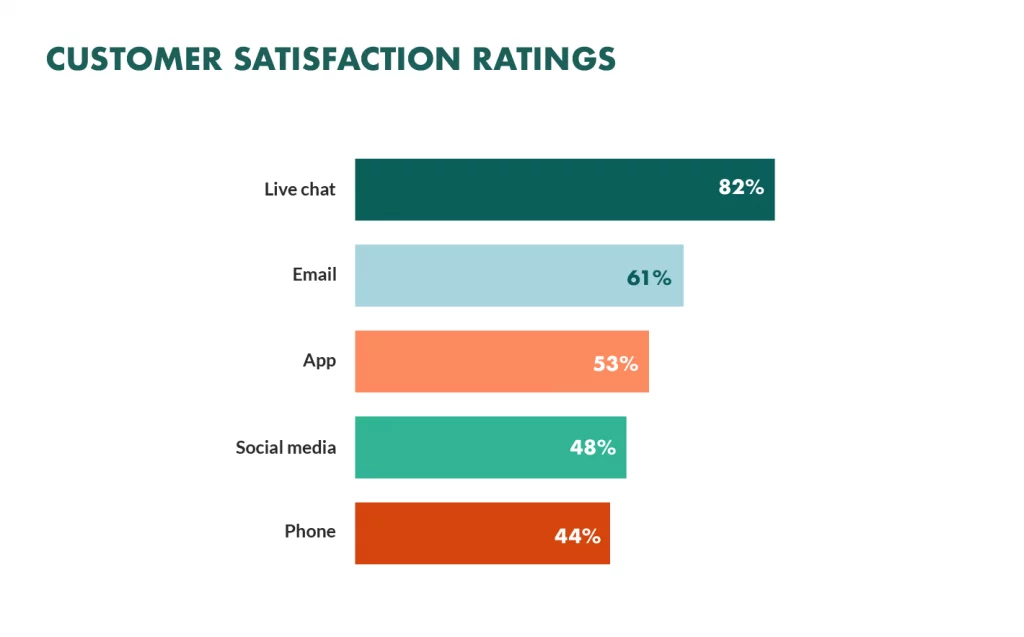
Live chat has become the preferred method of contact for modern customers who demand real-time communication across a range of devices.
In the digital age where we have emerging systems like XCaaS infrastructure to help optimize business processes and satisfy your customers, live chat is now a vital component of customer support.
Too many businesses fall short when it comes to their live chat strategy, with many skipping it completely. This presents an opportunity, so follow this handy guide to find out more about live chat best practices and common mistakes.
- Why do you need a live chat service?
- Live chat offers the ultimate convenience
- Live chat has a greater return on investment (ROI)
- Offering live chat places you above those who don’t
- Live chat saves time
- Live chat increases sales figures
- Live chat best practices
- 1. Place your live chat window where it makes sense
- 2. Act like a real human
- 3. Provide flawless communication
- 4. Don’t leave customers waiting too long
- 5. Utilize screen sharing
- 6. Remember to take a break
- Live chat common mistakes
- Not developing on previous exchanges
- Overwhelming the customer with questions
- Redirecting the customer to another support channel
- Final thoughts
Why do you need a live chat service?
Implementing live chat is key to providing top-tier customer support in the competitive online digital world.
Live chat offers a quick and easy alternative to other customer support options that involve long hold times or email exchanges that go on for days.
By keeping customers satisfied with a useful live chat tool, you’re more likely to see an increase in satisfaction and referral rates.
Let’s say you’re in the market for a new car insurance policy. You decide to contact a few different providers for quotes.
The first two providers have phone numbers listed, but you end up in a queue of 25+ customers, so you hang up. The next provider has an online form that you complete only to be told, ‘Thanks for your query, we will get back to you in 3-5 working days with your quote.’ Not good enough.
The final provider you contact has a well-functioning live chat service with friendly staff ready to help. With five minutes and a friendly chat, you’ve negotiated a deal and digitally signed and received your important documents. Winner.
Clearly, live chat has its benefits. Here are some of the reasons customers and businesses love it.
Live chat offers the ultimate convenience
Live chat is convenient for several reasons, including:
- Users are connected directly to an agent.
- Users can connect on any device from anywhere.
- Users can continue to multitask in the background if they’re busy.
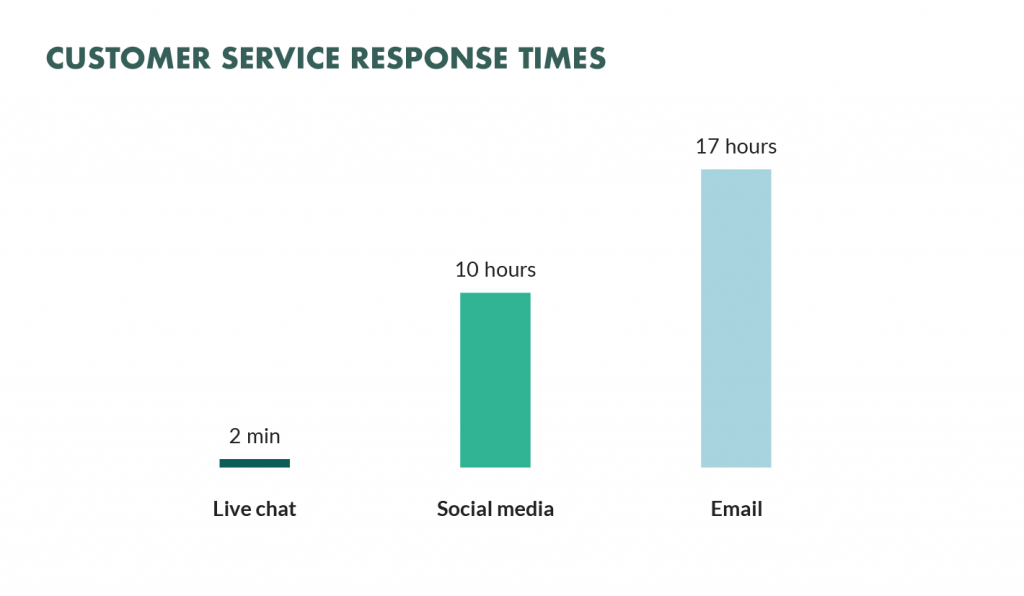
- Wait times are usually less than call centers or email exchanges.
- Queries are answered and solved instantly.
- A transcript can be kept for future reference.
Live chat has a greater return on investment (ROI)
Live chat is a cost-effective solution that requires less spending than other customer support methods.
While emails and phone calls have been, and continue to be, an important part of customer support, setting up these facilities requires time, money, and resources.
By being able to provide real-time support and even handle multiple queries at once, live chat saves on time, money, and resources to provide a greater ROI.
Offering live chat places you above those who don’t
A solid live chat strategy will put you head-and-shoulders above your rivals who haven’t got on board in today’s competitive markets.
And believe it or not, there are still plenty that hasn’t, so now is a great time to get ahead of the game and build lasting relationships with your customers.
Live chat saves time
One of the best ways to boost business success is to maximize productivity in the same amount of time. That’s what makes live chat the perfect choice.
Live chat has the potential for much faster response times over other customer support channels. By reducing a live chat agent’s workload and having them focus on conversations, a single agent could close over 40 customer tickets per hour. Call center agents or email teams often spend an hour solving just one.
Time is money, and the time saved thanks to live chat will benefit both businesses and customers alike.
Live chat increases sales figures
Extra support can be the trick to turning new leads into conversions. This is where live chat comes in. Live chat lets prospective customers speak directly with an agent who can support them through the buying process.

Perhaps a new lead is interested in your different types of testing software, without the extra support from an agent, they could lose interest and look elsewhere. An agent can answer their questions and make them confident enough to make a purchase. It could greatly improve your eCommerce checkout rate.
Live chat best practices
Now that we’ve seen some of the benefits of live chat, it’s time to go into live chat best practices and common mistakes.
1. Place your live chat window where it makes sense
Put yourself in the shoes of a customer navigating your website. Where would you expect to find a live chat option?
You need to place your live chat button where it will be of maximum benefit for you and the customer. This won’t always be a home page or contact page.
For example, if a customer enters your sales page from backlinks, a live chat option on a sales page will allow customers to ask questions or find out about payment options.
Alternatively, a chat window on an unsubscribe page could give you a chance to offer the customer a better deal or ask why they’re leaving.
Having a clear and visible live chat option could greatly reduce your bounce rate, but don’t let it distract from your website’s main content. Remember, it should be the user’s choice if they want to engage in a live chat or not.
2. Act like a real human
Don’t offer a live chat service only to then speak to customers like a robot.
Customers must leave your chat feeling like they connected with a real person rather than wondering if it was a chatbot at the other end. Of course, there are pros and cons to using AI chatbots for customer service, but real agents need to be just that, real. All too often, live chat agents stick to a script that makes them sound robotic and do not understand the issue at hand.
To help your agents sound more natural, offer training on communicating empathy and emotion through written words to keep customers feeling engaged, reassured, and satisfied. If possible, use names and politely greet customers as you would face-to-face. (An emoji or two won’t hurt either!)
By keeping it real, customers are more likely to reflect positively on the experience and come back in the future.
3. Provide flawless communication
Mistakes are bound to creep in when your agents are handling multiple chats at once. Unfortunately, typing the wrong name or response to a customer could ruin the experience and see them leave.
As the chats add up, agents may feel overwhelmed splitting their time and attention between different queries. Here are some tips to avoid mistakes:
- Read all messages carefully and twice over.
- Give clear and logical responses.
- Avoid being vague to stall customers and slow the chat down.
- Give detailed and readable responses.
- Proofread your message before sending it.
Of course, the aim is to resolve queries as fast as possible, but don’t sacrifice flawless communication in the process.
4. Don’t leave customers waiting too long
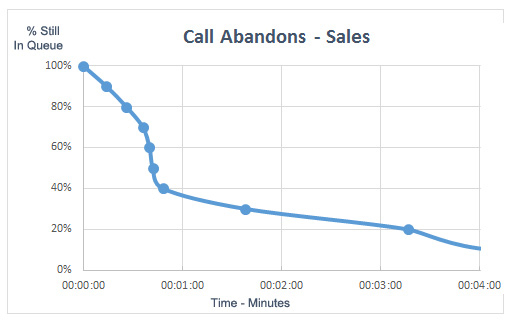
More than half of customers will abandon a sales call within one minute of waiting. This can be fixed through live chat.
Providing instant responses while engaging in five different live chats might not always be possible, but it’s important you don’t leave customers waiting too long.
Unlike email, live chat is about real-time support, so you need to be there for them until the query is solved or escalated to the next stage. If things are busy, agents should let customers know they will be with them shortly or connect them to another agent if possible.
There are also times when a customer might attempt to join a live chat out of hours when no one is available to talk. In these cases, show them your live chat hours or offer them alternative contact methods in the meantime.
Getting wait times down and keeping customers happy should be a key focus of your live chat strategy. Remember, happy customers are likely to spread the word, so making their experience enjoyable could be the trick to turning shoppers into advocates.
5. Utilize screen sharing
From time to time when things are difficult to explain, it may be useful for agents to share their screens with customers or vice versa.
For example, perhaps a customer is asking a specific question about the new cloud-based business phone system they purchased from you. Instead of typing out a long list of commands, you could share yours or their screen to show them exactly what to do.
Screen sharing is great for getting into specific queries to solve issues in real-time and should be a welcomed addition to any live chat service.
6. Remember to take a break
Remembering to take regular breaks to rest the eyes and relax the mind is important to ensure agents are operating at their best without feeling tired or stressed.
Nobody likes a grumpy live chat agent!
Live chat common mistakes
To keep customers satisfied and also benefit as a business from your live chat interactions, it’s best to avoid these common mistakes.
Not developing on previous exchanges
Too often, agents fail to look at a customer’s previous interactions or open cases when they start a new live chat.
Your customer shouldn’t need to explain everything from the very start again and give you every detail. It’s annoying and time-consuming. People dislike scripted replies that don’t actually help.
To avoid this, integrate your live chats with a CRM (Customer Relationship Management) tool and keep notes and transcripts on previous interactions and key updates.
It’ll go a long way in keeping customers less frustrated and more satisfied.
Overwhelming the customer with questions
You’ll need to collect information from your live chat users but resist the temptation to copy and paste all the required questions at once.
This might speed your job up, but it could overwhelm users and make them more likely to miss an answer and have to start again. Ask questions slowly and make sure you’ve received the required response before moving on.
Redirecting the customer to another support channel
You can only imagine the frustration of explaining an issue in length to a live chat agent only to be told you’ll have to phone the support line.
Avoiding this mistake will require a review of your internal procedures. If you’ve noticed multiple customer complaints that they weren’t able to solve their problem in the live chat, it could be time to rethink your support system.
Final thoughts
Hopefully, this guide for live chat best practices and common mistakes has got you thinking about the benefits of live chat, and how you can implement it successfully.
Get ahead of the game now and start your live chat strategy today.
Author’s Bio

Richard Conn is the Senior Director for Demand Generation at 8×8, a leading communication platform with integrated cloud contact center solutions, and voice, video, and chat functionality.