Why You Need a Review Plugin for Your WordPress Website

Why You Need a Reviews Plugin for Your WordPress Website

Summary

WordPress reviews plugins are powerful tools that help businesses collect, manage, and display customer feedback. By showcasing authentic reviews, websites can increase sales, build trust, and improve SEO. To maximize these benefits, businesses should choose a suitable plugin, like Stars Testimonials or Site Reviews, while avoiding critical mistakes such as ignoring negative feedback, using fake reviews, or overloading their site with multiple plugins.

Key takeaways

  • WordPress reviews plugins boost conversions, credibility, SEO rankings, and customer engagement through authentic social proof.
  • Choosing the right plugin depends on specific goals, like using Stars Testimonials or Customer Reviews for WooCommerce.
  • Avoid using fake reviews and overloading your website with multiple plugins to maintain trust and site performance.
  • Responding professionally and empathetically to negative reviews provides a valuable opportunity to build customer trust.

Nowadays, people rely on online reviews before making a purchase or decision. Like reading recommendations from a friend, positive reviews on your website can significantly boost your credibility and convince potential customers to trust your brand.

This is where a reviews plugin for your WordPress website comes in. These WordPress reviews plugins offer a powerful tool to collect, manage, and display customer reviews, turning them into valuable social proof.

customer reviews plugin Stars testimonials

Here’s why you should strongly consider adding a reviews plugin to your WordPress website:

Benefits of Using a Reviews Plugin in 2026

1. Increased Sales and Conversions

Positive reviews act as powerful persuasive tools. When potential customers see a collection of glowing reviews, it validates the product or service and builds confidence. This can significantly tip the scales in favor of a purchase, increasing sales and conversions.

2. Enhanced Credibility and Trust

Unlike marketing copy controlled by the business, user-generated reviews offer a layer of authenticity and social proof. Potential customers trust the opinions of others who have used the product or service, lending credibility to your brand. Reviews can also address common customer concerns and showcase real-world experiences, fostering trust.

Also Read: How to Capitalize on Your Customer Buying Patterns 

3. Improved Customer Engagement

Reviews plugins provide a platform for user interaction and feedback. Customers feel valued when they have a voice, and this can lead to a more engaged audience. Responding to reviews, both positive and negative, demonstrates that you care about customer experience and build stronger relationships.

4. SEO Advantages

Reviews can play a role in improving your website’s search engine ranking (SERP). Search engines value fresh, user-generated content, and reviews contribute to this. Also, reviews often contain relevant keywords that users might search for, improving your website’s ranking for those terms.

Also Read: How to Optimize Your Website for Search Engines with the Help of a Plugin

Features of a WordPress Reviews Plugin

A good WordPress reviews plugin goes beyond simply allowing customers to leave feedback. It equips you with the tools to manage, showcase, and leverage reviews to enhance your website and business. Here are some key functionalities offered by most review plugins:

1. Seamless Review Collection and Display

The core function of a reviews plugin is to streamline the process of collecting reviews from your customers.  Look for WordPress review plugins that offer user-friendly interfaces for both submitting and displaying reviews. This might include shortcode integration or dedicated widgets for easy placement of review sections on your website.

2. Customization Options for a Perfect Fit

Many WordPress plugins offer a variety of customization options to tailor the review layout and design to match your website’s aesthetic. This could include control over colors, fonts, star ratings,  and the ability to showcase specific review elements like reviewer names, avatars, or helpfulness ratings.

3. Spam Filtering and Moderation Tools

Unfortunately, spam and fake reviews can sometimes creep in.  A good reviews plugin will include spam filtering tools  to identify and eliminate suspicious activity.  Additionally, moderation tools allow you to review and approve incoming reviews before they are published, ensuring the quality and relevance of the feedback displayed on your website.

4. Integration Power

Many reviews plugins offer integration capabilities with other platforms you might already be using, such as e-commerce platforms, email marketing tools, or social media. This allows you to leverage reviews across different channels, further amplifying their reach and impact.  For example, you might be able to automatically sync product reviews with your online store or share positive reviews on social media to expand their visibility.

5. The Power of Public Response

Building relationships and fostering trust requires two-way communication.  A valuable feature of many review plugins is the ability to respond publicly to customer reviews,  both positive and negative.  This allows you to acknowledge positive feedback, address concerns raised in negative reviews,  and showcase your commitment to customer satisfaction.

By adding a feature-rich WordPress reviews plugin, you gain the tools to not only collect valuable customer feedback but also strategically leverage reviews to build trust,  improve your website’s SEO,  and drive sales.

6. SEO-Friendly Schema Markup

Enhancing your website’s visibility in search engines requires more than just collecting reviews—it also involves structuring them properly. Schema markup (structured data) allows Google to display rich snippets, such as star ratings, directly in search results. These attention-grabbing snippets improve click-through rates (CTR), drive organic traffic, and help Google index your review content more effectively. For businesses, especially those with physical locations, structured review data can significantly enhance local search visibility, making it easier for potential customers to discover your services.

By choosing a WordPress reviews plugin with built-in schema markup, you ensure that your reviews are optimized for search engines. Key features to look for include rich snippet support, which enables star ratings to appear in Google search results, and keyword optimization tools to enhance review metadata. Additionally, compatibility with Google Search Console allows you to track and analyze review performance, helping you refine your SEO strategy over time. With the right plugin, your reviews become a powerful asset, boosting both credibility and search rankings.

7. Mobile Responsiveness and Speed Optimization

With most users browsing on mobile devices, your reviews plugin must deliver a seamless experience across all screen sizes. A fully responsive design ensures that reviews are easy to read and interact with, whether on a desktop, tablet, or smartphone. Additionally, optimizing for speed is crucial—slow-loading reviews can frustrate visitors and increase bounce rates. Google also prioritizes mobile-friendly websites in search rankings, making responsiveness and speed essential for both user experience and SEO.

By selecting a WordPress reviews plugin with mobile optimization features, you enhance both usability and performance. Look for a plugin with a 100% responsive design to ensure smooth functionality on any device, as well as lazy loading to improve site speed by loading reviews only when needed. A lightweight code structure prevents unnecessary slowdowns, while AMP (Accelerated Mobile Pages) compatibility ensures faster loading times for mobile users. With these features in place, your reviews section remains engaging and accessible without compromising performance.

Also Read: 7 Smart Tactics to Get Customer Feedback for Your eCommerce Business

Popular WordPress Reviews Plugin Options

The world of WordPress reviews plugins is vast, offering a variety of options to cater to different needs and budgets. Here’s a quick look at a few popular choices:

Stars Testimonials

This plugin is a powerful tool to improve your website’s credibility and drive conversions through customer testimonials. With the free version, you can create unlimited testimonials with star ratings, company names, and customer images, all easily customizable without any coding. The plugin also seamlessly integrates with popular page builders like Elementor, making it effortless to add testimonials to your site.

Upgrade to the paid version for advanced features such as testimonial sliders, review collection from visitors, “Read More” buttons for longer testimonials, Google snippets compatibility, and a range of beautiful layout styles. Stars Testimonial Plugin empowers you to harness the persuasive impact of social proof and take your website’s reputation to new heights.

WordPress reviews plugin Stars Testimonials

Also Read: How to collect reviews with Star Testimonials – Premio

Site Reviews

A strong contender for free reviews plugins, Site Reviews packs a punch with a user-friendly interface and a variety of customization options. It offers Gutenberg block integration, shortcodes, and widgets for seamless review display, along with spam filtering and moderation tools. Site Reviews is a great all-around option for websites seeking a robust yet budget-friendly reviews solution.

WordPress reviews plugin Site Reviews

Smash Balloon Reviews Feed Pro

This WordPress plugin caters specifically to businesses that leverage reviews from external platforms like Google My Business, Yelp, Facebook, or Trustpilot. Smash Balloon seamlessly integrates these external review feeds into your website, allowing you to consolidate reviews from various sources and cohesively showcase them. This plugin is ideal for businesses that prioritize the power of third-party social proof.
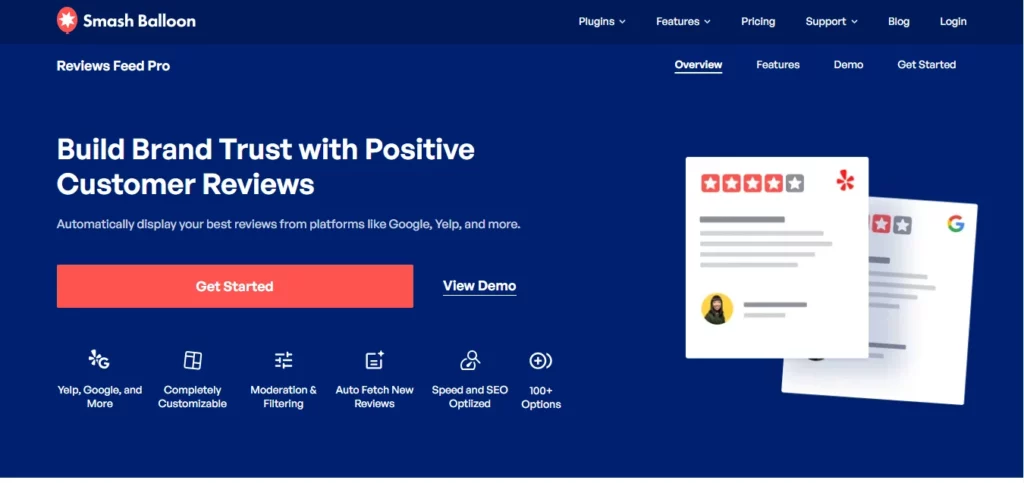
Smash Ballon

Customer Reviews for WooCommerce

If you run an online store built with WooCommerce, this free plugin is a perfect fit. It integrates seamlessly with your product pages, allowing customers to leave reviews directly after a purchase. This plugin streamlines the review process and keeps reviews contextually relevant to specific products. It’s a great option for WooCommerce stores looking to boost product credibility and drive sales.
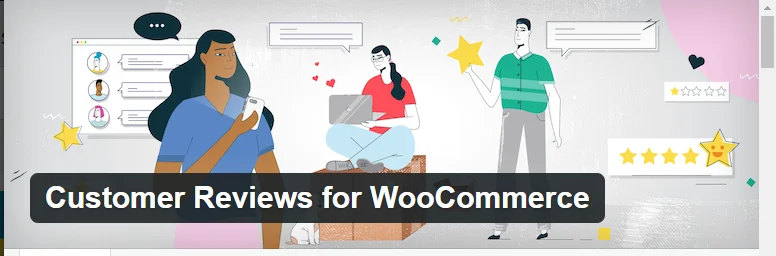
Customer reviews by WooCommerce

These are just a few examples, and the ideal plugin for you will depend on your specific needs and website type. Consider factors like the type of reviews you want to collect (product reviews, service reviews, etc.), your budget, and your desired level of customization when making your choice.

Best WordPress Review Plugins in 2026

Choosing the right WordPress reviews plugin depends on your website type, goals, and how you want to collect and display feedback. Below is a quick comparison of some of the best options in 2026, followed by recommendations based on specific use cases.

Quick Comparison

PluginBest ForKey FeatureFree/Paid
Stars TestimonialsBeginners & all-purpose useEasy setup + customizable testimonialsFree + Paid
Site ReviewsLightweight & flexibleModeration + Gutenberg supportFree
Smash Balloon Reviews Feed ProExternal review aggregationPulls reviews from Google, Yelp, FacebookPaid
Customer Reviews for WooCommerceeCommerce storesProduct-specific reviews + automationFree

Best for Beginners: Stars Testimonials

If you’re looking for a simple, no-fuss way to start collecting and displaying reviews, Stars Testimonials is a strong choice. It offers an intuitive interface, customizable layouts, and seamless integration with page builders like Elementor.

It’s ideal if you want to:

  • Get started quickly without technical setup
  • Display testimonials красиво across your site
  • Upgrade later for advanced features like sliders and rich snippets

Best for WooCommerce Stores: Customer Reviews for WooCommerce

For online stores, Customer Reviews for WooCommerce is built specifically to boost product credibility and conversions.

Key strengths:

  • Automatically request reviews after purchase
  • Display reviews directly on product pages
  • Improve trust at the exact point of decision

If you sell products, this is one of the most practical and conversion-focused options available.

Best for Aggregating External Reviews: Smash Balloon Reviews Feed Pro

If your business already has reviews on platforms like Google, Yelp, or Facebook, Smash Balloon Reviews Feed Pro helps you bring them all into one place.

Why it stands out:

  • Syncs reviews from multiple platforms
  • Builds strong third-party social proof
  • Keeps your website content fresh automatically

This is especially useful for local businesses and brands with an established online reputation.

Best Lightweight Option: Site Reviews

If performance and simplicity matter most, Site Reviews is a great lightweight alternative. It’s free, flexible, and doesn’t overload your site.

Highlights:

  • Clean interface with moderation tools
  • Shortcodes, widgets, and Gutenberg blocks
  • Minimal impact on site speed

Perfect for blogs, small business websites, or anyone who wants full control without complexity.

How to Choose the Right Plugin

To pick the best WordPress reviews plugin for your site, consider:

  • Your website type
    eCommerce → WooCommerce plugin
    Service/business → Testimonials or aggregated reviews
  • Your goal
    More conversions → Product reviews
    More trust → Testimonials or external reviews
  • Performance needs
    Want speed → Lightweight plugin
    Want features → Advanced plugin with integrations

Common Mistakes to Avoid When Using a WordPress Reviews Plugin

While a reviews plugin can be a powerful tool for boosting credibility, engagement, and SEO, mismanaging it can lead to lost trust, reduced conversions, and even penalties from search engines. Here are some common mistakes to avoid:

1. Ignoring Negative Reviews Instead of Addressing Them

Many businesses make the mistake of deleting, ignoring, or hiding negative reviews. However, negative reviews can actually build credibility—if handled correctly.

Why This is a Mistake:

  • Lack of transparency: Customers may think you’re hiding flaws or faking positive reviews.
  • Lost opportunity to improve: Negative reviews provide valuable feedback for refining your product or service.
  • Harm to reputation: Dissatisfied customers who feel ignored may escalate their complaints on social media or forums.

Best Practices:

  • Acknowledge the issue – Respond professionally and empathetically. Example: “We’re sorry you had this experience. Can you share more details so we can make things right?”
    Offer a resolution – Provide a refund, replacement, or an improved experience if appropriate.
    Take it offline if necessary – Encourage unhappy customers to reach out via email or phone.
    Use negative feedback for improvement – Identify common complaints and work on solutions.

2. Using Fake or Manipulated Reviews (How It Backfires)

Some website owners create or pay for fake reviews to appear more credible. While this may seem like an easy way to boost reputation, it can severely damage trust and even result in penalties.

Why This is a Mistake:

  • Loss of trust: Customers can often spot fake reviews, leading to skepticism about your business.
  • Legal consequences: Platforms like Google and Trustpilot have strict policies against fake reviews, and businesses caught manipulating feedback may face legal action.
  • SEO penalties: Google can flag and deindex websites using fake reviews.

Best Practices:

  • Encourage genuine reviews from real customers – Send follow-up emails or offer small incentives (like a discount on a future purchase).
  • Be transparent – Showcase both positive and constructive feedback to build authenticity.
  • Avoid “review swapping” or buying fake testimonials – Always prioritize ethical practices.

3. Overloading the Site with Too Many Review Plugins (Affects Performance)

Some site owners install multiple review plugins, thinking it will provide better features. However, using too many plugins can slow down website performance and cause compatibility issues.

Why This is a Mistake:

  • Slower load times: Too many plugins can reduce page speed, leading to higher bounce rates.
  • Plugin conflicts: Some plugins may not work well together, causing bugs or malfunctions.
  • Security risks: Unnecessary plugins increase vulnerability to hacking attempts.

Best Practices:

  • Choose one high-quality, feature-rich plugin that meets your needs.
    Test new plugins in a staging environment before installing them on your live site.
  • Regularly update and audit your plugins – Remove unused ones to improve performance.

4. Not Leveraging Schema Markup for SEO Benefits

Schema markup (structured data) helps search engines understand and display reviews in search results, making them more attractive to users. Many businesses overlook this feature, missing out on valuable SEO benefits.

Why This is a Mistake:

  • Lost opportunity for rich snippets: Without schema markup, your star ratings may not appear in Google search results.
  • Lower click-through rates (CTR): Search results with review ratings often attract more clicks than those without.
  • Weaker local SEO: Businesses with structured review data rank higher in local search results.

Best Practices:

Enable schema markup in your reviews plugin settings. Most plugins have built-in options for structured data.
Validate structured data using Google’s Rich Results Test.
Ensure consistency – If you display reviews on multiple pages, avoid duplicate structured data errors.

Addressing Negative Reviews

While positive reviews are music to any business owner’s ears, negative reviews are a reality that shouldn’t be ignored. Handling negative reviews professionally can be a golden opportunity to showcase your commitment to customer satisfaction and potentially turn a disgruntled customer into a brand advocate.

Here are some tips for responding to negative reviews positively and helpfully:

  • Acknowledge the Review Promptly: Don’t shy away from negative reviews. Address them quickly and publicly. This demonstrates that you care about customer feedback and are transparent in your dealings.
  • Respond with Empathy and Apology: Put yourself in the customer’s shoes. Acknowledge their frustration and apologize for their negative experience. A sincere apology goes a long way in diffusing tension and showing that you take their feedback seriously.
  • Focus on Solutions, Not Excuses: Don’t get defensive or try to make excuses. Focus on finding a solution to the customer’s problem. Offer specific steps you’ll take to rectify the situation and prevent similar issues in the future.
  • Be Professional and Courteous: Maintain a professional and courteous tone throughout your response, even if the reviewer is upset. Avoid getting into a public argument or using inflammatory language.
  • Take the Conversation Offline: For complex issues or highly emotional responses, consider taking the conversation offline. Offer to connect with the customer via email or phone to discuss the situation further and find a suitable resolution.
  • Learn from the Feedback: Negative reviews offer valuable insights. Analyze the feedback to identify areas for improvement in your products, services, or customer service processes. Use this as a learning opportunity to become a better business.

By following these tips, you can easily transform negative reviews into positive experiences.

Conclusion

Customer reviews hold immense power in influencing purchasing decisions and shaping brand perception. By incorporating a reviews plugin into your WordPress website, you unlock a treasure trove of benefits. If you’re looking for a powerful and user-friendly reviews plugin for your WordPress website, consider Stars Testimonials. This feature-rich plugin offers a seamless solution to collect, manage, and display reviews and testimonials from your customers.

Don’t wait any longer. Get started with Stars Testimonials today and watch your WordPress website flourish with the power of positive reviews.