If you are a small business, then you know that every penny counts. That is why it is important to make sure that you are using the best technology possible to help you save money and grow your business– from content marketing strategy to even your communication system.
This is where the multiline phone system fits into the picture. If your business has a large volume of incoming and outgoing calls, then a multiline phone system is the most efficient. cost-saving way to manage your calls.
But, many of them still have no idea what this system is or how it can benefit their business. In this blog post, we will discuss what a multi-line phone system is, how it can benefit your business and some of the different types that are available on the market.
What Is a Multiline Phone System?
The multi-line phone system is such a breath of fresh air for businesses that want to have multiple lines without having to pay for separate phone lines. It’s basically a phone system that has two or more phone lines that share a single phone number.
While live chat is currently gaining traction, multiline phone system is perfect for businesses that want to have separate lines for different departments or purposes.
For example, you can have one line for customer service and another for sales. This way, your customers will be able to reach the right department without having to go through the hassle of being transferred.
The great thing about this type of system is that it allows businesses to save money on their communication costs. In addition, it also offers a number of features that can be very beneficial for businesses, such as:
- Call waiting
- Caller ID
- Voicemail
- Three-way calling
Those features above will not only improve your business efficiency but will also make things more convenient for both your customers and clients.
How Does a Multiline Phone System Work?
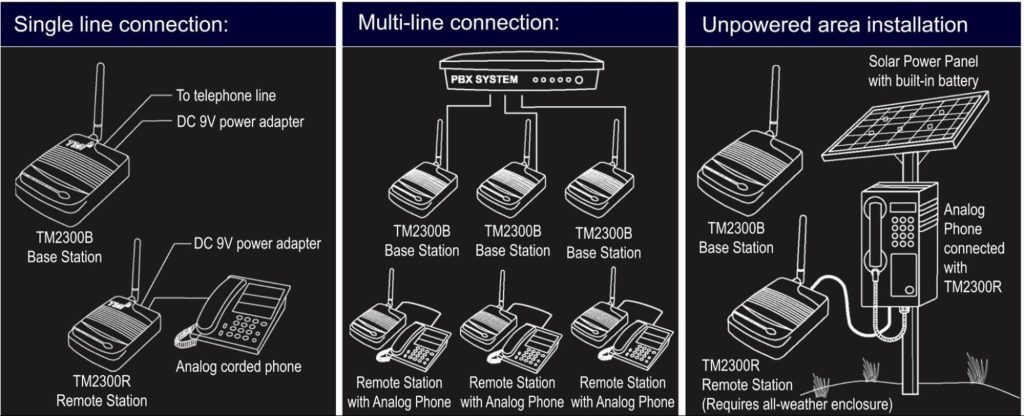
A multiline phone system works similarly to a traditional one-line phone system. The only difference is that it has two or more phone lines that share the same phone number. In addition, companies can also get 800 numbers for business and keep the communication going.
Each line will have its own extension, so when someone calls your main business line, they will be able to choose which extension they want to be connected to.
So, if they want to reach your customer service department, they would just need to dial your main number and then press the extension for customer service.
How Can It Benefit Your Business?
Now that we understand what exactly a multiline phone is, why do your businesses need it? Well, there are many benefits that come along with using a multiline phone system.
Quick and Easy to Install
You don’t need to be a big business with a deep pocket just to have a multi-line phone system.
The best part about the multi-line phone system is that it is very user-friendly and can be easily installed by anyone. Plus, the monthly fees are very reasonable, making it a great investment for small businesses.
All you need is a reliable internet connection and you can have a business phone line up and running in no time.
Reduced Costs
As we mentioned earlier, one of the main benefits of using a multiline phone system is that it can help reduce your communication costs.
This is because you will no longer need to pay for separate phone lines for each extension. In addition, you will also be able to take advantage of features such as call waiting and caller ID, which can save you even more money.
Multi-line phone systems are becoming increasingly popular among small businesses due to the many benefits they offer. If you are looking for a way to improve your business efficiency and reduce your communication costs, then a multiline phone system is the way to go.
Improved Customer Service

Another great benefit of using a multiline phone system is that it can help improve your customer service. This is because it provides your customers with the ability to reach you at any time of the day or night.
In addition, it also allows them to leave a voicemail if you are unavailable to take their call. This voicemail can be easily retrieved and you can get back to your customer as soon as possible.
When you have astounding customer service, your customers are more likely to continue doing business with you and may even refer you to their friends or family.
Better Time Management

Another benefit that comes along with using a multiline phone system is that it helps businesses better manage their time. This is because the system allows companies to route calls to the appropriate department or extension.
The Drawbacks
All those advantages come with a few disadvantages as well. The first one is that if you don’t have a reliable internet connection, your phone lines will not work.
In addition, if you are using a VoIP service, there might be a slight delay in the audio quality. However, this is usually not noticeable and does not affect the overall quality of the call.
The second drawback is that if you use a traditional phone line, you will need to pay monthly fees for the installation.
However, this is not the case with VoIP services, which are much more affordable.
Also, the new hires or new customer service agents might find the whole concept of the multiline phone system confusing.
So, it’s also crucial to make sure that all your employees or customer service teams have resources they need. You can also train them using training videos to use the system correctly.
Popular Forms of Multiline Phone Systems
Multiline VoIP phone systems come in a variety of different types, each with its own set of features and benefits. The three most popular types of systems are:
Key Systems
Key systems are perfect for businesses that have a limited number of phone lines. These systems come with a variety of features such as call waiting, caller ID, voicemail, and three-way calling.
Key systems are very user-friendly and can be easily installed by anyone. In addition, they are very affordable, making them a great option for small businesses.
PBX Systems
PBX systems are perfect for businesses that have a large number of phone lines. These systems come with a variety of features such as call waiting, caller ID, voicemail, three-way calling, and call forwarding.
PBX systems are a bit more expensive than key systems but they offer a lot more features. In addition, PBX systems are very user-friendly and can be easily installed by anyone.
Now that you know more about multi-line phone systems, it’s time to decide which type is right for your business. key systems are perfect for businesses with a limited number of phone lines, while PBX systems are perfect for businesses with a large number of phone lines.
How to Choose the Right Multi-line Phone System?
Now that you know two different forms of multi-line phone systems, how do you choose the right one for your business?
Determine your budget
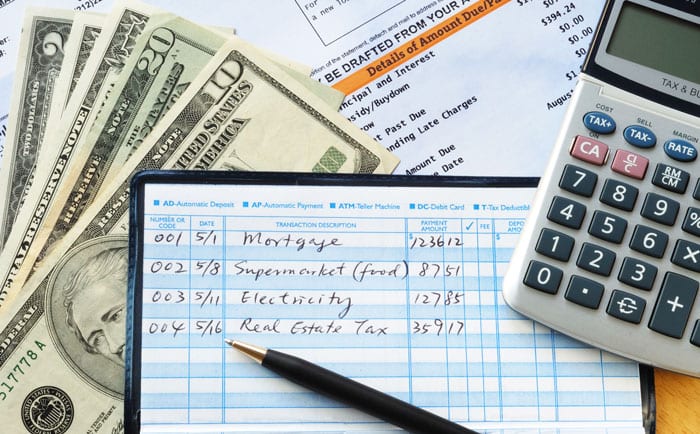
The first step is to determine your budget. Once you have done this, you can then narrow down your options and choose the system that best suits your needs.
If you are looking for a more affordable option, then a key system may be the way to go. However, if you are looking for a more feature-rich option, then a PBX system may be the better choice.
Consider your business needs
The next step is to consider your business needs. You will need to think about the number of phone lines you have and what features you need.
If you have a limited number of phone lines, then a key system may be the best option. However, if you have a large number of phone lines and need more features, then a PBX system may be the better choice.
Choose the right provider
The last step is to choose the right provider. When choosing a provider, you will want to make sure that they are reputable and offer a good warranty. You will also want to make sure that the provider offers support in case you have any problems with your system.
Consider your employee’s skills

Will your employees need to be trained? How user-friendly is the system?
You will want to make sure that you choose a system that is easy to use and does not require a lot of training.
In addition, you will want to make sure that the provider offers support in case you have any problems with your system.
Do Your Small Businesses Need It?
Besides all those pros and cons of the multiline phone system mentioned above, one question is left – do your small businesses really need it, though?
A multiline phone system is a good idea for your small business if:
- You need a separate phone number for each of your employees
- You need to be available 24/7
- Your clients are located in different time zones
- You have a significant number of incoming and outgoing calls
If you can relate to any of those points, then a multiline phone system is definitely something you should consider for your business.
Wrapping Up
Small business is not all about finding out buyer persona, creating SEO strategies, or improving website UX.
Phone calls are still an important part of doing business and a multi-line phone system can help your small business run more efficiently.
If you are getting a lot of phone calls and struggling to keep up but don’t have thousands of bucks to allocate, then it’s time to jump on the bandwagon.
Author’s Bio: Andre Oentoro is the founder of Breadnbeyond, the award winning explainer video services. He helps businesses increase conversion rates, close more sales, and get positive ROI from explainer videos (in that order).